- Companion iPhone app The same native control surface in your pocket, built on the same engine — full volume, input, zone, and now-playing control from anywhere on your network.
- Denon receiver support A third wire protocol joins the lineup, bringing Denon network receivers into the same unified interface as everything else.
- More Shortcuts actions Deeper Apple Shortcuts coverage, so more of the app can be driven by automation and triggered from Siri.
Magic AV Remote
A fast, focused desktop app for controlling Pioneer and Onkyo home-theater receivers — full transport, tone, zone, and metadata control from your Mac, with no remote in hand.
Magic AV Remote speaks fluently to receivers on both of the major control protocols used in the home-theater market over the last decade. It exposes the receiver as a clean, observable model and gives you a single UI that adapts to whichever feature set the connected unit actually supports — no shimming, no guessing.
Core control
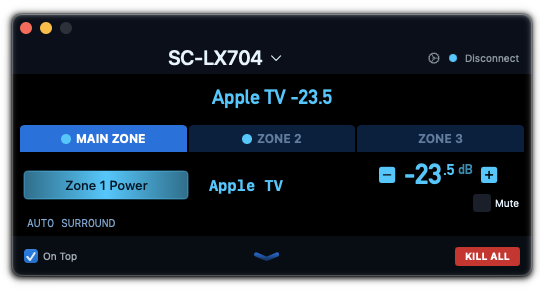
Power & volume
One-click power, precise dB-accurate volume readout, smooth press-and-hold ramping, mute with visible state.
Input selection
Full input picker with 40+ source types. Custom names you've set on the receiver are read back and displayed.
Listening modes
Browse and apply surround/listening modes, with current mode reflected live as the receiver updates.
Tone & EQ
Bass, treble, and equalizer presets and bands where supported — the panel hides itself when the receiver doesn't expose them.
Channel level metering
Per-speaker channel display with individual trim, so you can dial in a room without leaving your desk.
Multi-zone
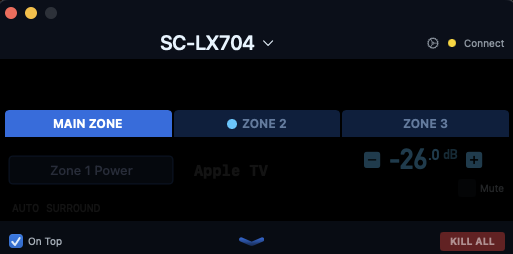
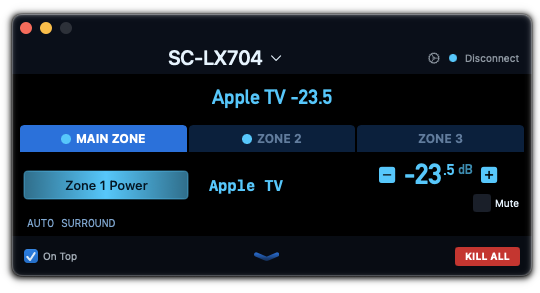
Independent control of the main zone, Zone 2, and Zone 3 — power, volume, mute, and input each tracked per zone.
Now playing
Live metadata
Track title, artist, and album from network sources (AirPlay, streaming services) appear in real time as the receiver reports them.
Album art
When the receiver makes it available over the network, jacket art appears alongside the track metadata. Availability depends on your receiver's firmware and the current source, so it isn't shown for every source.
Transport controls
Play, pause, skip, and source-specific commands routed transparently to the active streaming source.
Service awareness
The app recognizes which network service is active and labels the panel accordingly, so it's clear what you're listening to.
.png)
.png)
.png)
.png)
Built for the desktop
Hardware media keys
The Mac's volume-up, volume-down, and mute keys retarget your receiver while the app is focused — no system volume side effects, no extra permissions.
Multi-window
Open as many windows as you have receivers. Each window remembers its own receiver selection and layout across launches.
Always-on-top mode
Optional floating-window behavior keeps the control panel above your other work when you want one-glance access.
Per-receiver themes
A full theming system with a built-in editor lets you tune every color in the UI — or pick from curated presets like Onyx, Pearl, Ember, and Ruby. Each receiver gets its own theme, so windows pointed at different receivers can look completely different side-by-side.
Shortcuts & automation
Native Apple Shortcuts actions for power, volume, mute, input selection, and player transport — zone-aware where applicable. Build scenes, bind global hotkeys, or trigger your receiver from any automation that can run a Shortcut, whether the app is open or not.
Network discovery
Receivers on your LAN are detected automatically. Save them with friendly names; the app handles IP changes and reconnects.
Resilient connections
Automatic reconnection and typed failure reporting mean the app behaves predictably even on a long-running session.
.png)
.png)
.png)
Anatomy of the control window
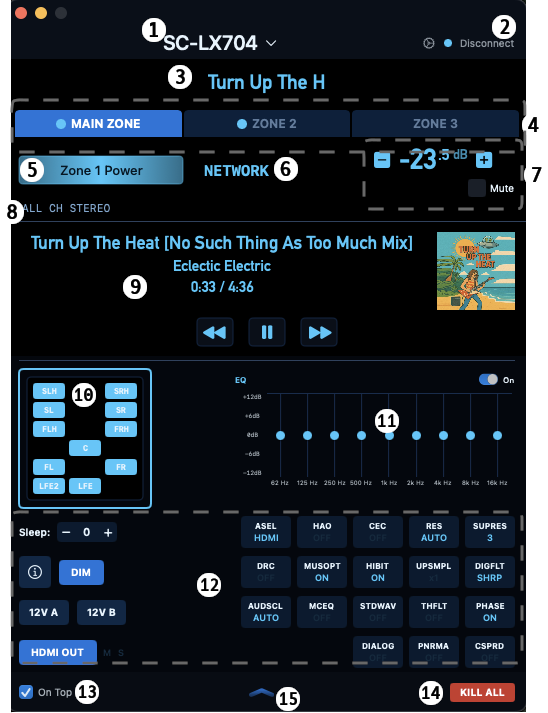
A guided tour of the on-screen controls. The control window adapts to the protocol of the connected receiver — modern-protocol units expose the full feature set shown below; legacy-protocol units use a tailored layout matched to their capabilities.
Modern protocol
Key
- Receiver selector menu
- Connection status + Connect/Disconnect
- Front Panel Display (mirrors the receiver's front panel)
- Zone tabs — Main / Zone 2 / Zone 3
- Selected-zone power toggle
- Current input (click to select)
- Volume readout, ± steppers, and Mute
- Current listening mode (click to select)
- Network / streaming source panel — metadata, album art (when the receiver provides it), transport
- Output channel matrix (active outputs are lit)
- 9-band graphic EQ (63 Hz → 16 kHz) with on/off toggle
- Advanced features area (toggles open and closed)
- a.ASEL — Audio Selector
- b.HAO — HDMI Audio Out
- c.CEC — HDMI Control
- d.RES — Resolution
- e.SUPRES — Super Resolution
- f.DRC — Dynamic Range Control
- h.HIBIT — Hi-Bit
- i.UPSMPL — Up-sampling
- j.DIGFLT — Digital Filter
- k.AUDSCL — Audio Scaler
- l.MCEQ — MCACC EQ
- m.STDWAV — Standing Wave
- n.THFLT — THX Loudness Filter
- o.PHASE — Phase Control
- p.DIALOG — Dialog Enhancement
- q.PNRMA — Panorama
- r.CSPRD — Center Spread
- s.Sleep timer ±
- t.Display brightness / info
- u.DIM — Dimmer
- v.12V trigger A
- w.12V trigger B
- x.HDMI OUT selector
- "On Top" — always-on-top toggle
- KILL ALL — power off every zone
- Advanced Features view toggle
Legacy protocol
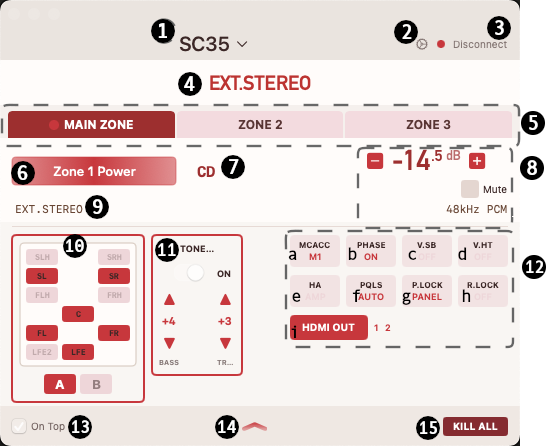
Key
- Receiver selector menu
- Connection status
- Connect/Disconnect
- Front Panel Display (mirrors the receiver's front panel)
- Zone tabs — Main / Zone 2 / Zone 3
- Selected-zone power toggle
- Current input (click to select)
- Volume readout, ± steppers, Mute, and live signal info (sample rate / format)
- Current listening mode (click to select)
- Output channel matrix (active outputs are lit) with A / B speaker-terminal selectors
- Tone controls — Bass and Treble trim with on/off toggle
- Advanced features area (toggles open and closed)
- a.MCACC — MCACC preset
- b.PHASE — Phase Control
- c.V.SB — Virtual Surround Back
- d.V.HT — Virtual Height
- e.HA — HDMI Audio routing
- f.PQLS — Precision Quartz Lock System
- g.P.LOCK — Panel Lock
- h.R.LOCK — Remote Lock
- ·HDMI OUT selector
- "On Top" — always-on-top toggle
- Collapse advanced features
- KILL ALL — power off every zone
System requirements
- macOS 14.0 or later
- Apple Silicon Mac
- Local network connection to your receiver
- A supported Pioneer or Onkyo receiver (see list above)
Supported receiversclick to expand the full model list
Modern protocol — Onkyo (since before 2015) and Pioneer (from the 2017 product cycle onward)
Used by every networked Onkyo receiver and by Pioneer's lineup after the two brands merged. Carries rich state including streaming metadata and album art (where the receiver exposes it).
As a rule, any Onkyo device with an Ethernet port or built-in Wi-Fi uses this protocol.
Legacy protocol — Pioneer receivers prior to the 2017 product cycle
Pre-merger Pioneer home-theater receivers. Still in active service in many homes today — Magic AV Remote talks to them natively, exposing the same unified UI.
Some 2016 models bridge the transition and may respond to both protocols depending on firmware.
Premium models that share identical Telnet command strings for custom home-theater integration.
Your data stays on your Mac. Period.
No telemetry. No analytics. No tracking. No accounts. No cloud. Magic AV Remote talks to your receiver on your local network and to nothing else. Nothing about you, your usage, your receiver, or what you're listening to is ever collected, logged remotely, or transmitted off your computer — not to us, not to anyone. The app has no servers to phone home to because there are no servers.